Detailing business guide
Boat detailing invoice template
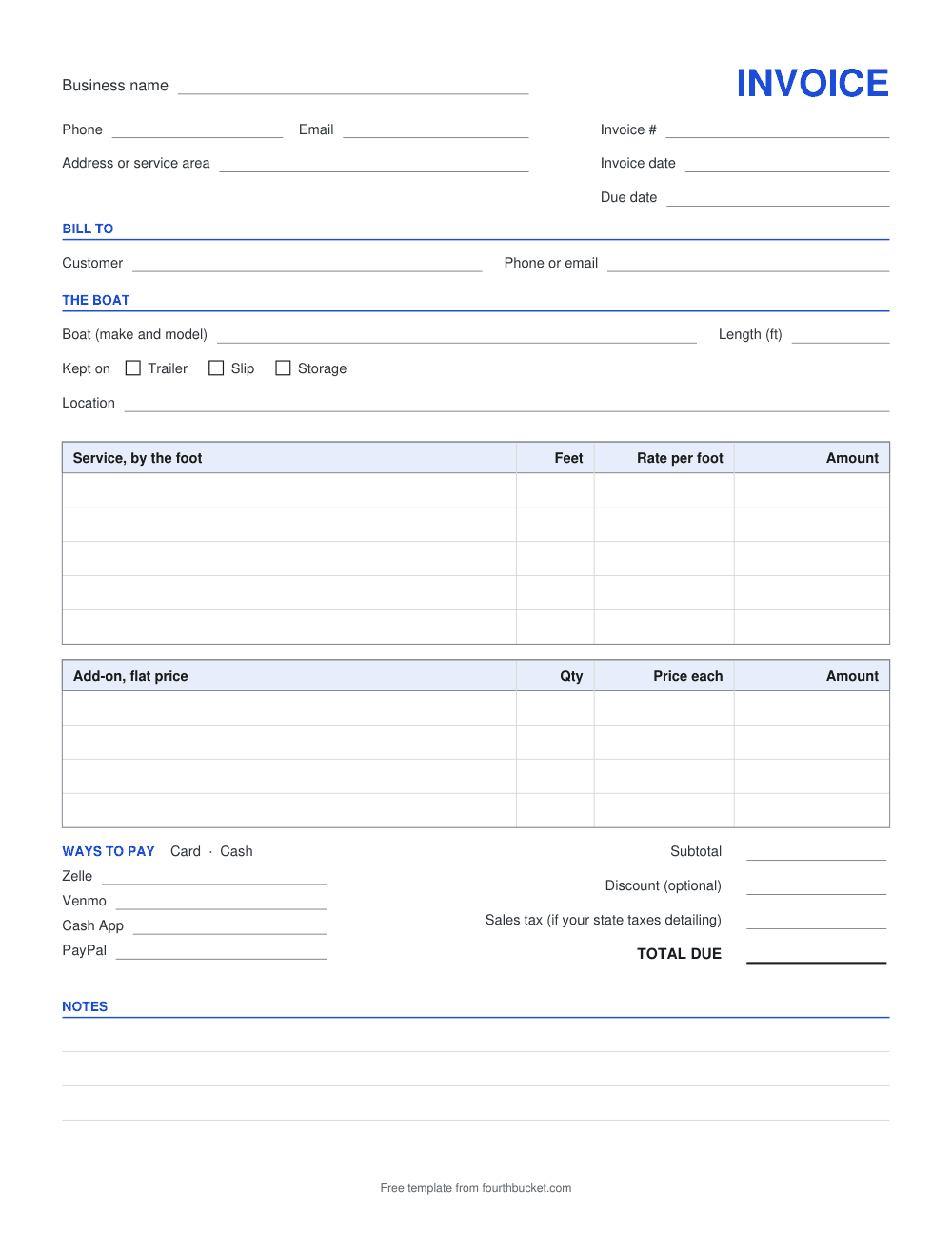
A boat detailing invoice tells the customer what you did to the boat and what they owe. If you price boats by the foot, a car invoice doesn't fit: it has no place for the boat's length or a rate per foot. This one has both, with lines for flat-price add-ons under them. Download it for Word or Excel, or as a PDF to print. There's a matching boat estimate template for quoting before you start.
Download the boat detailing invoice template
- Download the boat detailing invoice template as Word (.docx), also opens in Google Docs and Apple Pages
- Download the boat detailing invoice template as Excel (.xlsx), also opens in Google Sheets and Numbers
- Download the boat detailing invoice template as PDF, to print and fill in by hand
Blank, free, and no signup. The Excel file works out the by-the-foot lines (from the length you type once), the add-ons and the totals for you; in Word and on the printed PDF you fill them in yourself. Each file ends with a small line, “Free template from fourthbucket.com”, which you can delete in the Word and Excel files.
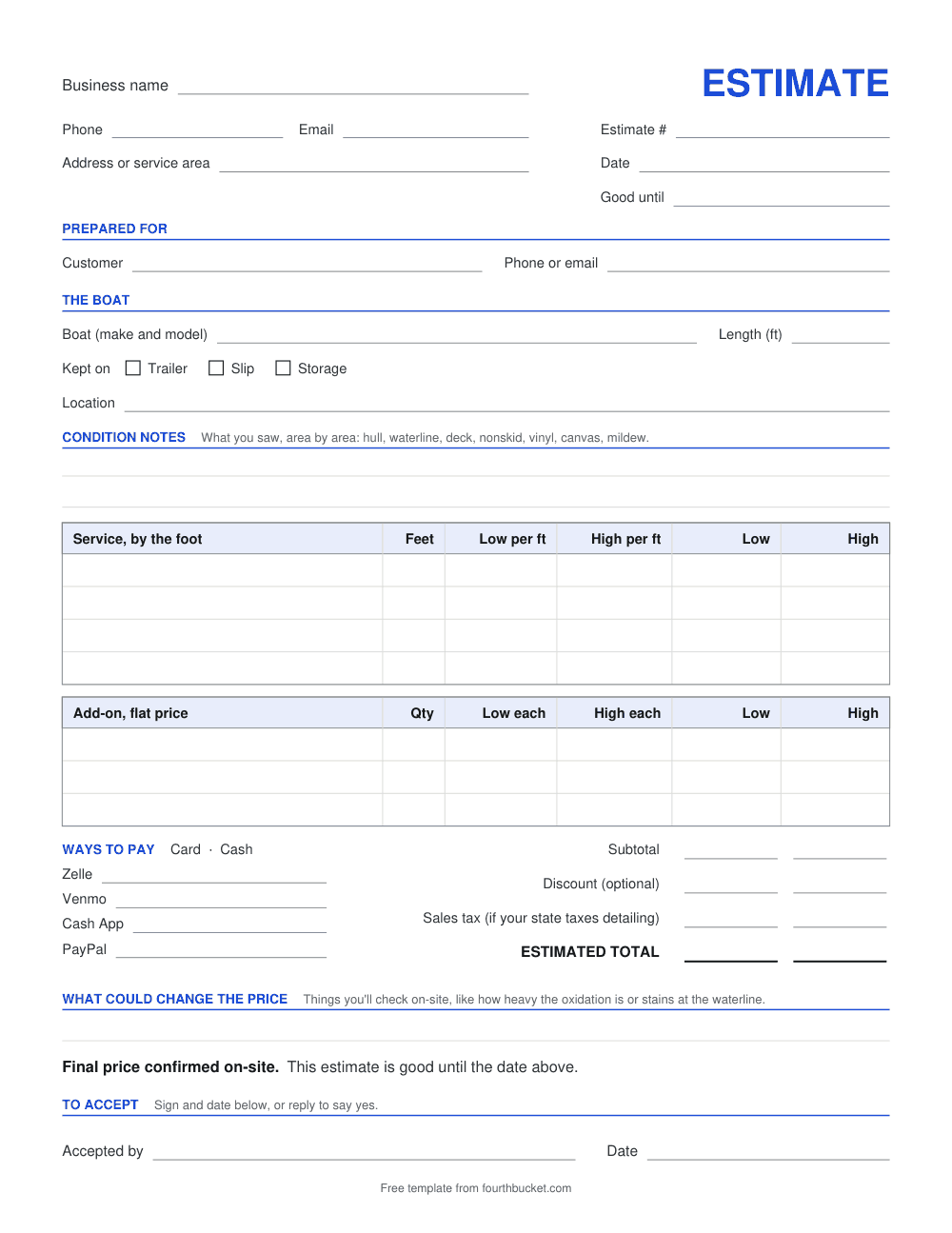
Boat detailing estimate template
For quoting before the job. It has the same boat details, notes on the boat's condition, a low and a high rate per foot for each service, and add-ons with a Qty and a low and a high price each, so the customer sees a range. It ends with what could change the price, “Final price confirmed on-site,” and a line to accept.
- Download the boat detailing estimate template as Word (.docx), also opens in Google Docs and Apple Pages
- Download the boat detailing estimate template as Excel (.xlsx), also opens in Google Sheets and Numbers
- Download the boat detailing estimate template as PDF, to print and fill in by hand
Blank, free, and no signup. The Excel file works out the by-the-foot lines (from the length you type once), the add-ons, and the low and high totals for you; in Word and on the printed PDF you fill them in yourself. Each file ends with a small line, “Free template from fourthbucket.com”, which you can delete in the Word and Excel files.
What a boat detailing invoice needs
- The boat. Make and model, so the invoice is tied to the boat you worked on.
- Its length in feet. Every by-the-foot line is worked out from it, so it belongs where the customer can see it.
- Where it's kept. On a trailer, in a slip or in storage, and where: the marina and slip number, the storage yard or the address. That's where you did the work, and where you'll go next time.
- Lines priced by the foot. Each one shows the service, the feet, your rate per foot and the amount, so the customer can check the arithmetic.
- Add-ons at a flat price. Anything you don't charge by the foot, on its own line, with a quantity for things there's more than one of.
- The totals, in order. The subtotal, then any discount, then sales tax if you charge it, then the total due. Whether to charge sales tax depends on your state, and work on a boat can be taxed differently from work on a car. Our page on sales tax on car detailing is about cars and other motor vehicles, so ask your state's tax department about boats.
- How and when to pay. An invoice number, the due date, and the ways the customer can pay you.
Rather fill one in on screen? The detailing invoice template has a form you fill in and print. It has no length box, but a by-the-foot line still works there: put the feet in Qty and your rate per foot in Price each.
Pricing a boat by the foot
On a by-the-foot line, the amount is the boat's length times your rate per foot for that service. On a 24-foot boat, every by-the-foot line is 24 times its rate; on a 30-foot boat, 30 times. In the Excel file you type the length once, in a shaded box, and every by-the-foot line uses it. To price one service by a different length, type that length in its own Feet box.
Decide how you measure, and measure every boat the same way: for example, whether your length includes the swim platform or the bow pulpit. Say how you measure on your price list or your estimate, so two customers with the same boat get the same price.
The rates are yours to set. Nothing on the templates is filled in, and this page doesn't suggest any. To work a job out from your own rates per foot, try the boat and RV detailing price calculator. To see what your time and supplies cost you, start with how to price a detailing job.
What to check before you quote a boat
- Whether you can work there. Ask the marina or storage yard whether outside detailers can work on boats there, and what it needs from you first.
- Water, power and runoff. Ask whether there's a hose and an outlet you can use, and what the marina allows for wash water and the products you bring. If there's no hose or outlet for you, plan to bring your own water and power.
- What you can reach. A boat on a trailer you can walk around. In a slip you're working from the dock, and the hull below the waterline is out of reach. Quote the work you can actually get to.
- What it looks like now. Oxidation on the gelcoat, stains at the waterline, the nonskid deck, mildew on the vinyl and canvas. Photos from the owner help you see the size of the job; the estimate's condition notes are where you write it down.
- A range, then the final price. Give a low and a high rate per foot on the estimate, name what could move it, and confirm the final price on-site before you start. More on that in the detailing estimate template.
Boats and Fourth Bucket
Fourth Bucket is an estimate and invoice app for mobile detailers. Its AI photo estimates are built for cars, trucks, vans and SUVs, not boats. For a boat job you can still use it with a quote you price yourself: add each service as a custom item at the price you type, in whole dollars, send the quote as a link your customer can accept, and turn it into an invoice. The app doesn't multiply by the foot, so work out each line first.
Quotes you price yourself and invoices are free on every account, and for your car, truck, van and SUV jobs, your first 10 AI photo estimates are free, with no card.
Frequently asked questions
How do you price boat detailing by the foot?
Multiply the boat's length in feet by your rate per foot for each service, then add anything you charge a flat price for. On these templates, each by-the-foot line shows the feet, the rate and the amount, so the customer can follow it. In the Excel file you type the length once and every by-the-foot line uses it.
How should I measure a boat for a by-the-foot price?
That's your call. What matters is measuring every boat the same way and saying how, for example whether your length includes the swim platform or the bow pulpit. Write the length on the estimate and the invoice, so the customer sees the number you multiplied by.
What should a boat detailing invoice include?
Your business name and contact details, an invoice number and dates, the customer, the boat's make, model and length, where it's kept, each by-the-foot service with its feet, rate and amount, any flat add-ons, the totals, and how to pay.
What's the difference between the boat invoice and the boat estimate?
The estimate is for before the job: condition notes, a low and a high rate per foot for each service, what could change the price, and a line for the customer to accept. The invoice is for after: one rate per foot, the amount owed and how to pay it.
Can Fourth Bucket estimate a boat from photos?
No. Fourth Bucket's AI photo estimates are built for cars, trucks, vans and SUVs. For a boat, use these templates, or make a quote you price yourself in the app: add each service as a custom item at the price you type, in whole dollars, and turn the accepted quote into an invoice. Quotes you price yourself and invoices are free on every account.
Keep reading: RV detailing invoice template · Boat and RV detailing price calculator · Detailing estimate template · Detailing invoice template
Send quotes and invoices at your own prices.
Quotes you price yourself and invoices are free. Your first 10 AI photo estimates, for cars, trucks, vans and SUVs, are free too — no card required.