Detailing business guide
Car wash invoice template
This invoice is for washing many vehicles for one customer: a company's vans, a dealer's lot, a rental fleet. One invoice covers a period, with a line for each visit or wash type: the date, the wash, how many vehicles, the price each and the amount. Download it for Word or Excel, or as a PDF to print. Washing one car? The detailing invoice template fits that better.
Download the car wash invoice template
- Download the car wash invoice template as Word (.docx), also opens in Google Docs and Apple Pages
- Download the car wash invoice template as Excel (.xlsx), also opens in Google Sheets and Numbers
- Download the car wash invoice template as PDF, to print and fill in by hand
Blank, free, and no signup. The Excel file works out each line (the vehicles times the price each) and the totals for you; in Word and on the printed PDF you fill them in yourself. Each file ends with a small line, “Free template from fourthbucket.com”, which you can delete in the Word and Excel files.
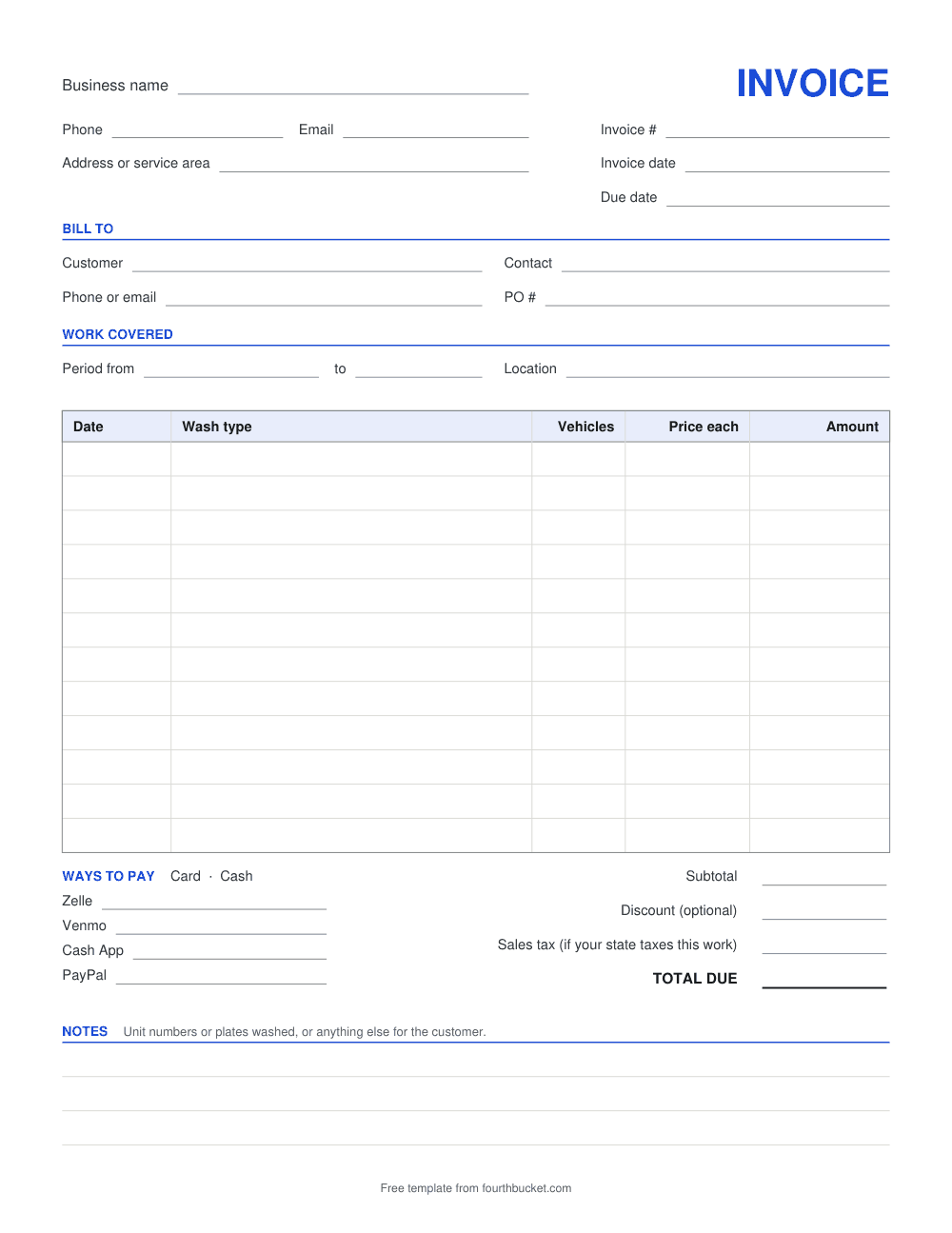
What a car wash invoice for a fleet needs
- The business and a contact. Who you're billing, and the person who checks your invoices.
- A PO number, if they use one. It's the customer's own reference for work they've approved. Put it on every invoice it covers so their office can match yours to it.
- The period covered. A start and an end date, so it's clear which washes the invoice is for and none is billed twice.
- Where you washed. The address or the lot. If you wash at more than one site for the same customer, ask whether they want an invoice per site.
- A line per visit or wash type. The date, the wash type, how many vehicles, the price each, and the amount: the vehicles times the price each.
- Which vehicles, if they ask. If the customer wants unit numbers or plates listed, the Notes box has room for them.
- The totals and the due date. The subtotal, any discount, sales tax if you charge it, the total due and when it's due. Whether to charge sales tax is covered under sales tax on car detailing.
In the Excel file, type the number of vehicles and the price each on a line, and the amount, the subtotal and the total work themselves out. For 12 vans, type 12 under Vehicles and your price under Price each. A blank Vehicles box counts as 1.
Agree on these before the first wash
A business is easier to bill when the terms are written down first. Put these in a written quote, and have the customer approve it:
- • Which vehicles, which wash, and how often.
- • Where and when: at their lot, before the vehicles go out or after they come back.
- • The price for each wash type, per vehicle, and how a vehicle that isn't there, or an extra one, is billed.
- • How you'll bill: after each visit or once for the period, and how many days they have to pay.
- • What their office needs from you, such as proof of insurance or a PO number on every invoice.
- • Where you can wash on their lot, and where the wash water can go. Check your local rules too.
For the written quote, the detailing estimate template works: a line per wash type, with a low and a high price until you've seen the vehicles. Looking for fleet customers in the first place? See work vehicles that run all winter in the winter guide, with a message to send.
Your prices, not ours
The template comes blank, and this page doesn't suggest a price. To see what a wash costs you in time and supplies, start with how to price a detailing job. If you wash boats or RVs too, they have their own templates, priced by the foot: the boat detailing invoice template, the RV detailing invoice template and the boat and RV detailing price calculator.
Fleet work and Fourth Bucket
Fourth Bucket is an estimate and invoice app for mobile detailers. Its AI photo estimates are for one car, truck, van or SUV at a time: the AI drafts the condition report, and the price range is worked out from your own menu prices. For a fleet, a quote you price yourself fits better: add each wash as a custom item at its total for all the vehicles, in whole dollars, send the quote as a link the business can accept, and turn it into an invoice.
Quotes you price yourself and invoices are free on every account, and your first 10 AI photo estimates are free, with no card.
Frequently asked questions
What goes on a car wash invoice for a fleet?
Your business details, an invoice number and dates, the business you're billing and a contact there, their PO number if they use one, the period the invoice covers and where you washed, then a line for each visit or wash type with the date, the wash, the number of vehicles, the price each and the amount. Then the totals and how to pay.
Should I send one invoice per visit or one a month?
Whichever you and the customer agree on, in writing, before the first wash. This template does either: set the period to one day or a whole month, and add a line for each visit.
What is a PO number?
A purchase order number is a business's own reference for work it has approved. If the customer gives you one, put it on the invoice so their office can match your invoice to it. If they don't use them, leave the box empty.
Can I use this template for one car?
You can, but for one vehicle the detailing invoice template fits better. It has a line for the vehicle, and you can fill it in on the page and print it, or download it for Word, Excel or PDF.
How should I price washing a fleet?
The prices are yours to set, so the template comes with none. Work out what one wash of each type costs you in time and supplies, then decide whether the number of vehicles or a regular schedule changes your price, and put it in a written quote before the first visit.
Keep reading: Detailing invoice template · Detailing estimate template · Boat and RV detailing price calculator · How to get detailing customers in winter
Send quotes and invoices at your own prices.
Quotes you price yourself and invoices are free. Your first 10 AI photo estimates are free too — no card required.